Back to Blogs
Discover how businesses can get real-time AI security camera alerts at a low cost without replacing their existing hardware. Learn what features to look for in a cloud video platform.
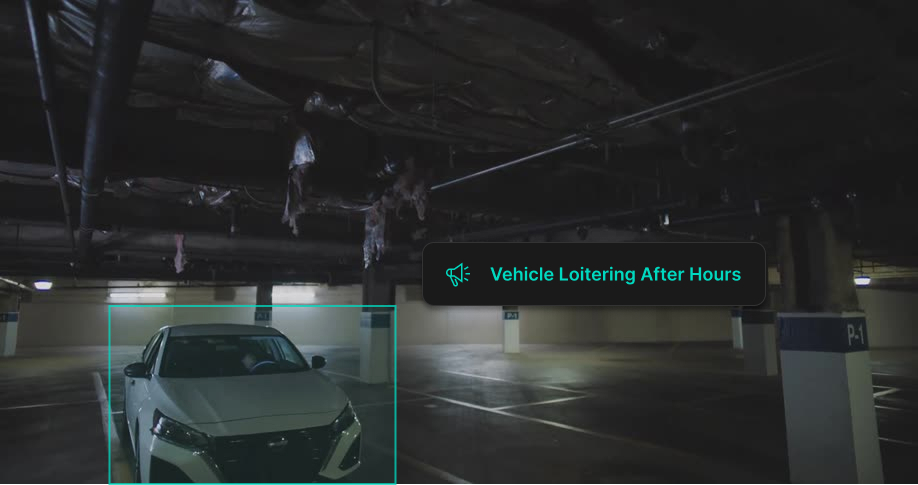
To get real-time security camera alerts on a budget, businesses can connect a cloud-based AI video analytics platform to their existing IP security cameras. Instead of paying thousands of dollars for a brand new hardware system, this software upgrade adds intelligent person and vehicle detection to the cameras you already own. This approach keeps infrastructure costs low while providing instant mobile and desktop notifications when specific threats occur. As a result, business owners can respond immediately to actual security events rather than ignoring a flood of false alarms.
Traditional CCTV systems that simply record footage are no longer enough to meet modern security demands. In the past, basic motion detection triggered an alert anytime pixels changed on the screen. This resulted in constant false alarms caused by moving shadows, weather changes, passing animals, or swaying trees. Because the alerts were unreliable, operations managers often ignored them entirely.
Real-time AI security camera alerts solve this problem through machine learning and advanced video analytics. Rather than looking for basic motion, AI algorithms analyze the video feed to identify specific objects and behaviors. The system understands the difference between a person walking near a restricted area and a branch blowing in the wind. This active intelligence filters out the noise and ensures your team only receives notifications for verified security events. It turns passive footage into a proactive operational tool.
Modern AI security platforms offer a variety of customizable alerts designed to protect your facility proactively. Depending on your unique business needs, you can configure your system to notify you about several different scenarios:
Yes. The ability to retrofit your current system is the most important factor in keeping costs low.
AI alerts are driven primarily by local processing power at the edge, not by continuously sending raw video to the cloud. The hardware that makes this possible is the AI-NVR, a hybrid cloud appliance with a dedicated GPU built inside that handles the heavy lifting on-site. Think of it as a purpose-built edge computing device, similar in concept to a high-performance gaming console, that runs advanced machine learning models directly at your facility. On occasion, select video clips are sent to cloud-based AI for additional analysis, but the core detection happens locally. Because the majority of processing stays at the edge rather than in a distant data center, LiveReach can deliver real-time detection at a price point that makes enterprise-grade security genuinely accessible to small and mid-sized businesses.
IP cameras connect to the AI-NVR using the ONVIF standard, a universal protocol supported by the vast majority of cameras from major brands manufactured in the last decade. For businesses that still run older analog cameras, those feeds route to the AI-NVR as well, so even legacy infrastructure doesn’t have to be replaced.
By layering a modern software platform over your current digital cameras, you avoid construction costs, cabling expenses, and massive system downtime. For environments that still rely on older analog setups, hybrid recorders or encoders can bridge those cameras to the cloud. You can read more about this exact architecture in our upcoming AI NVR article.
Pricing for real-time security camera alerts varies wildly depending on the vendor and the architecture you choose.
The traditional enterprise approach is highly expensive and increasingly frustrating to manage. Legacy systems often require costly proprietary servers, manual maintenance, and expensive hardware replacements every time you need more storage or processing power. They are rarely browser-based, meaning staff must install dedicated apps on every device, and system upgrades require manual intervention rather than happening automatically in the background. In these models, scaling becomes prohibitively expensive and operationally disruptive as your business grows.
The budget-friendly alternative combines a one-time hardware investment with an ongoing software subscription. The AI-NVR is purchased upfront, but because it replaces a traditional server setup and works with your existing cameras, you eliminate the far larger capital expenditure of buying new lenses or proprietary infrastructure. You also won’t need to deal with fees for installation, cabling, or labor. From there, you pay a software licensing fee to run the AI analytics and access the cloud dashboard. If you do have blind spots that require new hardware, some modern providers even include NDAA-compliant 4K cameras alongside your deployment. This straightforward pricing structure allows small to mid-sized businesses to access enterprise-grade security without the massive initial investment of a full legacy system.
When evaluating AI video security systems, business owners should look for platforms that prioritize ease of use and long-term flexibility. Here is a checklist of critical features:
LiveReach AI helps organizations upgrade existing security cameras with a hybrid cloud platform that combines powerful edge processing and cloud accessibility for video surveillance, analytics, alerts, and access control. Designed to scale with your business, the platform provides proactive protection by combining real-time threat detection with centralized visibility across one site or hundreds.
By preserving your existing infrastructure and offering powerful tools like our Video Intelligence product, LiveReach AI makes modern security accessible and highly effective. Customers nationwide trust the platform to secure their operations. As Derek Anderson, Director of Operations at The Salvation Army, noted, their organization can rest assured that their facilities are being monitored by a reliable and effective security system thanks to LiveReach AI.
To learn more about how we simplify security management without the heavy hardware costs, visit our Why LiveReach page.
AI security cameras trigger alerts based on specific programmed criteria rather than general pixel movement. You can set the system to notify you only when it detects a person in a restricted area, a vehicle entering a lot after hours, specific safety hazards, or unauthorized access control events.
How much do AI security camera alerts cost for a small business?
Costs are kept accessible through a combination of upfront hardware and a low monthly software subscription per camera. The AI-NVR is a one-time appliance investment, and the ongoing software fee per camera is designed to be predictable and budget-friendly for small and mid-sized businesses. For organizations that prefer to spread the cost, LiveReach also offers financing options that bundle hardware and software into a single monthly payment, eliminating the need for a large capital outlay upfront. Either way, the total cost of ownership is significantly lower than traditional enterprise systems that require ongoing server maintenance, proprietary hardware replacements, and IT overhead.
Can I get AI alerts without replacing my existing cameras?
Yes. Modern cloud video platforms are designed to tap into existing IP cameras from almost any brand. This allows you to add powerful analytics, facial search, and real-time alerts without replacing your current infrastructure.
What is the difference between AI alerts and standard motion detection?
Standard motion detection triggers an alarm anytime the camera image changes. This leads to constant false alarms from weather, shadows, or animals. AI alerts use machine learning to specifically recognize human shapes, vehicles, and distinct behaviors, ensuring your notifications are accurate and actionable.
How many cameras can I monitor with real-time alerts?
Cloud-based systems are built for limitless scalability. You can manage anywhere from a single camera to thousands of cameras across multiple locations from one centralized dashboard.
Do I need on-site hardware or is cloud-based monitoring available?
Yes. The AI-NVR is the on-site appliance that makes everything work. It houses a dedicated GPU that processes your camera feeds locally at the edge, running AI detection in real time without sending raw video to the cloud. Once events are detected, the results sync securely to the cloud dashboard, giving you remote access from any device. This hybrid approach, local AI processing combined with cloud accessibility, is what keeps the system both fast and affordable.
Schedule a demo of our platform to see how LiveReach can improve security at your organization.
Request Demo